
Many Net Techs have heard of a STIG (Security Technical Implementation Guide) but most have never actually looked at them before. The STIG first came into existence in 1989 when the DISA began to produce them. These, combined with NSA guides are considered the “best practices” for information assurance within DOD systems. While there is nothing that says that your systems MUST be configured to their standards it is important to realize that by not configuring them in the recommended way means that you are accepting risk. There is nothing wrong with accepting risk (we do it each and every day in our professional and personal lives), but we should be smart about how we accept that risk.
The list of STIGs is extensive (far too large to post here) and changes regularly as technology changes. They are updated as new threats emerge and new best practices are established. While there are some that are FOUO or even classified the bulk of the one’s that I have looked at that are of interest to me personally as a Net Tech are actually available for public distribution and don’t even require PKI to view. All of this is accessible by going to DISA’s Information Assurance Support Environment (IASE) website.
There are a few things that you’ll see when you visit the site. The first thing that you may encounter are SRGs (Security Requirements Guide). According to DISA the SRG is:
SRGs are collections of requirements applicable to a given technology family. SRGs represent an intermediate step between Control Correlation Identifiers (CCIs) and Security Technical Implementation Guides (STIGs). CCIs represent discrete, measurable, and actionable items sourced from Information Assurance (IA) controls defined in policy, such as the National Institute of Standards and Technology (NIST) Special Publication (SP) 800-53. STIGs provide product-specific information for validating and attaining compliance with requirements defined in the SRG for that product’s technology area.
Basically it is a big picture type of document that says what type of policies and configurations should be made to a category of something (could be software, routers, switches, etc) in order to make it secure. It is technology specific, not vendor specific. SRGs can layout many of the IA requirements that you need to consider in the event that a STIG for your specific system doesn’t exist.
The STIG on the other hand is generally vendor specific and lays out detailed rules (and helps actually implement those rules) for a specific system (there are individual STIGs for both Cisco and Juniper routers for example).
Both STIGs and SRGs categorize vulnerabilities into one of three categories or CAT. CAT I is considered a critical vulnerability and must be mitigated before a system can be considered safe for operation while CAT III vulnerabilities should be evaluated and mitigated if possible but will not prevent a system from operating in a relatively secure manner.
Using a STIG
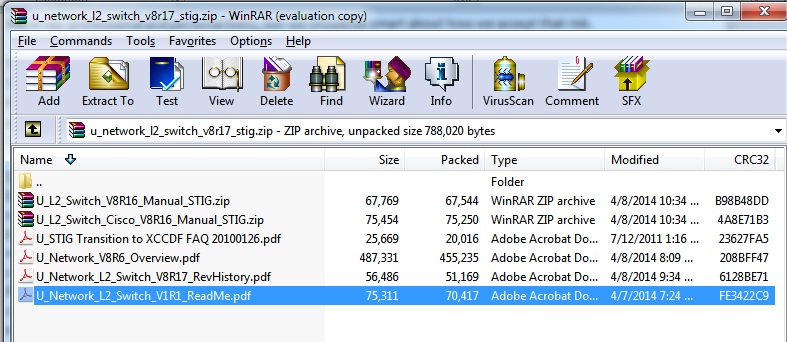
When you download a STIG, you’re actually downloading a zip file that contains a number of other files. Once upon a time, the STIGs were documents simply as a normal word file. Recently this has changed to an .XML file that is importable into a variety of tools (keep reading).
As a quick example, we’ll take a look at “Network L2 Switch STIG Version 8 Release 17” (aka, the STIG you want to look at for your later two access switches). When you download the zip file and open it up, you see a number of files:
- U_STIG Transition to XCCDF FAQ 20100126.pdf: Describes process that DISA is using to transition from the old Word files to XML files.
- U_Network_V8R6_Overview.pdf: A basic overview about this particular STIG, what it applies to, and also has background information on things that pertain to the STIG.
- U_Network_L2_Switch_V8R17_RevHistory.pdf: A history of all revisions of this particular STIG.
- U_Network_L2_Switch_V1R1_ReadMe.pdf: Tells you about the files within the STIG
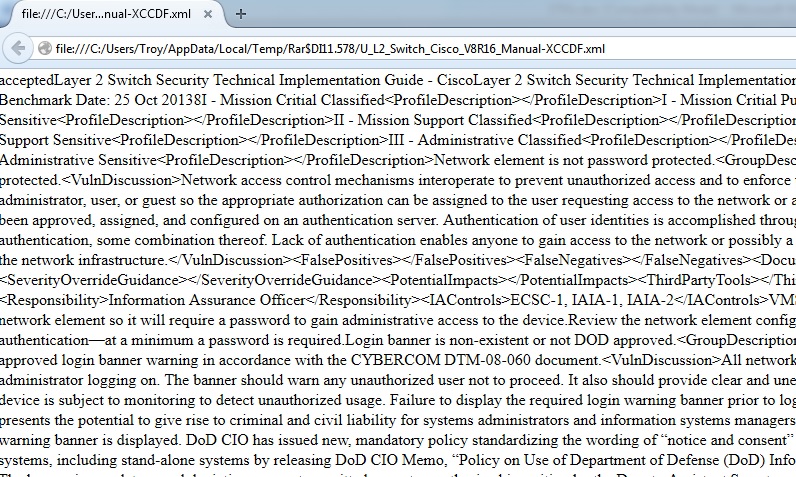
Finally, you see two additional zip files “U_L2_Switch_Cisco_V8R16_Manual_STIG.zip” and “U_L2_Switch_V8R16_Manual_STIG.zip”. This file contains three additional files:
- U_L2_Switch_Cisco_V8R16_Manual-XCCDF.xml: Is the XML file for the STIG itself. It contains all of the information for that particular STIG. If you open it up though, it’s not very easy to read as you can see. Instead, you need the other two files.
- STIG_unclass.xsl and DoD-DISA-logos-as-JPEG.jpg: Common files that are used across all of the UNCLASSIFIED STIGs. It is used to format and display the STIG into something that you and I can read without trouble. The only trick to this is the fact that you have to actually extract all three of those into the same place onto your computer. Then you can open the XML file and it will be formatted correctly.
So you might be wondering why they did it this way instead of just using a Word document like before. The reason is because DISA has developed tools that import the rules from the XML files to automatically check compliance with some things, and also to generate full on checklists.
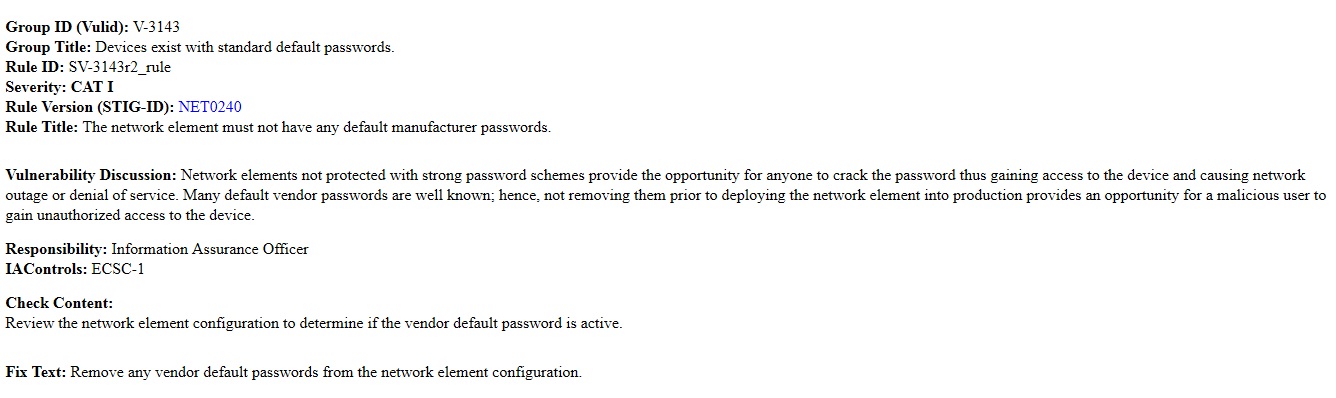 One final thought. You would think (and in my opinion, rightfully so considering the amount of money that these guys are getting paid) that all of our systems (WIN-T, ABCS, etc.) have been fully vetted to meet at the very least all CAT 1 and probably most CAT II STIG requirements as part of their baseline configuration. While certain are the net techs responsibility to change (WIN-T did change the default password for your routers and switches from cisco but it is still a default password) but other things should be part of the default configuration. I won’t go in and list what vulnerabilities are still there but it would be a great homework project for you to take the STIG and evaluate compliance on the baseline configurations.
Main Photo By: iLeatt
STIGs are loosely known and barely understood. Most people just know of their existence and that they are at times hard to comply with. Good post. Shared your page so hopefully you get some more likes.
I use the nsa guides..they are a bit better than the SANS at explaining what is going on.
https://www.nsa.gov/ia/mitigation_guidance/security_configuration_guides/archived_guides.shtml
While there are no hard requirements in Army regulation that STIGs are to be used, the newly institute Command Cyber Readiness Inspections (CCRI) use them as their checklists and they are the standard to be compliant in any DIACAP or RMF acceptance configuration. Learn how to use them NOW to save yourself reconfiguration headaches later …
Incorrect or missing STIG settings will result in a CM-6 “Configuration Settings” finding (NFR, etc.) on audit.
From NIST 800-70:
“Organizations should apply checklists to operating systems and applications to reduce the number of vulnerabilities that attackers can attempt to exploit and to lessen the impact of successful attacks. There is no checklist that can make a system or product 100 percent secure, and using checklists does not eliminate the need for ongoing security maintenance, such as patch installation. However, using checklists that emphasize both hardening of systems against software flaws (e.g., by applying patches and
eliminating unnecessary functionality) and configuring systems securely will typically reduce the number of ways in which the systems can be attacked, resulting in greater levels of product security and protection from future threats. Checklists can also be used to verify the configuration of some types of security controls for system assessments, such as confirming compliance with certain Federal Information Security Modernization Act (FISMA) requirements or other sets of security requirements.”
“Federal agencies are required to use appropriate security configuration checklists from the NCP when available. In January 2017, Part 39 of the Federal Acquisition Regulation (FAR) was updated. Paragraph (c) of section 39.101 states, “In acquiring information technology, agencies shall include the appropriate information technology security policies and requirements, including use of common security configurations available from the National Institute of Standards and Technology’s website at https://checklists.nist.gov. Agency contracting officers should consult with the requiring official to ensure the appropriate standards are incorporated.”
The key take away is we use checklists for initial configuration and ongoing maintenance of systems for the same reason airplane pilots use a checklists for every takeoff and landing – people forget, become overly familiar with a task and make mistakes.
Mistakes flying can be catastrophic.
Mistakes in cybersecurity configuration can results in damage to systems, loss of data and intellectual property, loss of the business, and in life safety, industrial, and high security systems, loss of property and life.
A version of the old saying in flying “Learn from the mistakes of others, you won’t live to make them all yourself” applies in cybersecurity as well.
😉